
Akiflow is fast. Dainvo is calmer.
That is the real difference for most people comparing these two planners.
Akiflow is built for people who want a command center for tasks, calendars, messages, shortcuts and AI assistance. Its official pages lead with Aki, an AI executive assistant, a Universal Inbox that can import tasks from 3000 plus tools, workflows, shortcuts and meeting features.
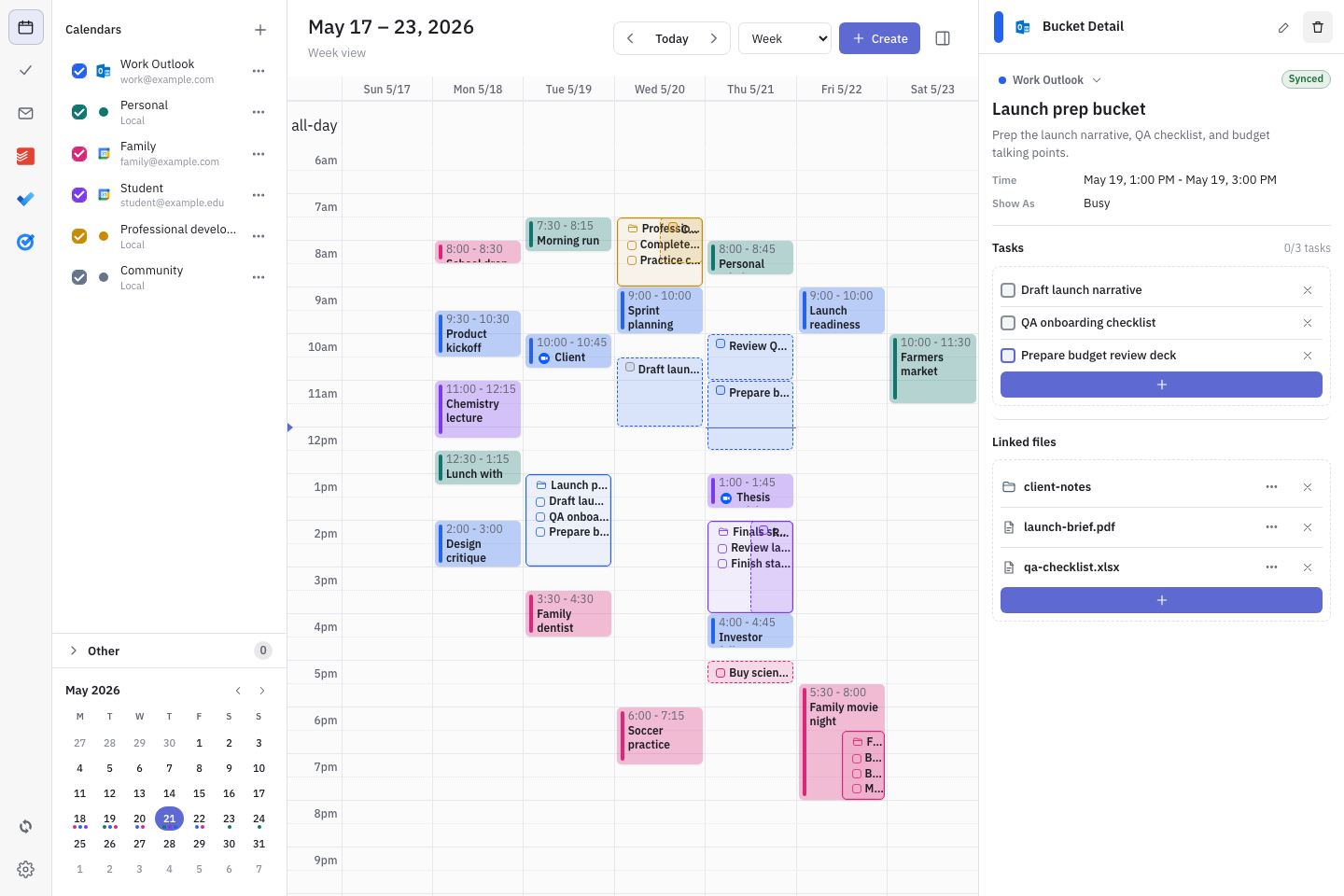
Dainvo is built around a simpler promise: bring your calendars, tasks, meeting links and work files together so you can see your day, plan what matters and open the right thing when it is time to work.
So the question is not only "Which app has more features?"
The better question is:
Do you need more speed, or more clarity?
Verdict: choose Dainvo if you want a calmer Akiflow alternative
Choose Akiflow if you are a power user with tasks coming from many apps, messages, emails and workflows. It is a stronger fit if you want a fast capture system, keyboard driven planning, AI workflows and a heavy duty inbox for everything you might need to process.
Choose Dainvo if you want a simpler daily planning app that keeps your calendar, tasks, meetings and files in one place without making your planning system feel bigger than your actual work.
Dainvo is also much easier to justify on price. Dainvo Pro is available at the $5/month launch price, while Akiflow lists its Pro Yearly plan at $19/month billed yearly and its Pro Monthly plan at $34/month.
Dainvo vs Akiflow comparison
| Category | Dainvo | Akiflow |
|---|---|---|
| Best for | Calm daily planning with calendars, tasks, meeting links and files in one place | Power users who want fast capture, shortcuts, AI workflows and a universal inbox |
| Planning style | Clear day view, time blocking and work context | Command center style planning with inbox processing and quick actions |
| Tasks | Sync tasks from current apps and keep them visible next to your schedule | Universal Inbox imports tasks from many tools, with automatic imports from integrations |
| Meetings | Keeps meeting links near the rest of your day | Meeting notifications, scheduling links and meeting assistant direction |
| Files | Built around keeping work files close to the plan | Stronger on task and calendar workflows than file first planning |
| Integrations | Google, Outlook, Apple, and CalDAV calendars; Dainvo Tasks, Google Tasks, Microsoft To Do, Todoist, TickTick, and Obsidian tasks; Meet, Teams, Zoom, and Webex; optional AI connections. Outlook Email is in development. | Official pages mention Google Calendar, Outlook, Gmail, Slack, Microsoft Teams, Zoom and more |
| AI | Not the main public positioning | Aki AI assistant and AI workflows are central to current positioning |
| Price | Pro at the $5/month launch price | $19/month billed yearly or $34/month billed monthly |
| Best fit | People who want less tool sprawl and a lower cost daily planner | Founders, executives and operators with many inputs to process |
Sources: Dainvo homepage and integrations page; Akiflow pricing, features and Aki pages.
Akiflow is built like a command center
Akiflow makes the most sense when your work starts outside your planner.
You get a Slack message. You flag an email. A task appears in another tool. A meeting needs to move. You need to capture something quickly before it disappears.
That is where Akiflow is strong. Its Universal Inbox is designed to pull tasks from many tools into one place, and its official feature page says it can automatically import tasks from 3000 plus tools.
Akiflow also leans heavily into speed. Its official comparison pages talk about an advanced command bar, natural language, Universal Inbox, offline mode and Aki as an AI executive assistant.
That is useful if you like managing your day from a powerful control panel.
But not everyone wants that much system.
Some people do not want to process another inbox. They want to open one planner, see what is happening today and start the next thing with less friction.
That is where Dainvo has the better story.
Dainvo is built for practical clarity
Dainvo's public homepage leads with "Practical Clarity For Real Life" and says it brings calendars, tasks, meeting links and work files together in one place.
That matters because most people do not lose time only because they forgot a task.
They lose time because the work is scattered.
The calendar is in one place. The task is in another. The meeting link is inside an invite. The file is in a drive, folder or email thread. The follow up is somewhere else.
Dainvo's positioning is simple: see the day, plan it and have the right things ready when it is time to work.
Its Why Dainvo page puts this clearly: Dainvo brings calendars, tasks, meetings and follow ups together so you can see what needs attention without jumping between apps. It also focuses on blocking time for important work and keeping meeting links, tasks and files connected to your schedule.
That makes Dainvo a strong Akiflow alternative for people who want planning to feel lighter.
Workflow comparison: capture everything vs get ready to work
Here is the cleanest way to compare the two tools.
Akiflow workflow
- Inputs from apps, email and messages
- Universal Inbox
- Process, organize and schedule
- Use shortcuts, workflows or Aki
- Execute from calendar and task plan
Dainvo workflow
- Calendars, tasks, meetings and files in one place
- See what matters today
- Block time for the work
- Open the meeting link or file when it is time
- Do the work with less switching
Akiflow helps you capture and process more inputs.
Dainvo helps you reduce the number of places you need to look before starting.
Both are useful. The better choice depends on what is causing the friction in your day.
If the problem is that work comes from everywhere, Akiflow may fit better.
If the problem is that your day feels scattered, Dainvo is the better place to start.
Context switching: where the tools feel different
Akiflow tries to solve context switching by pulling more inputs into one inbox. That is valuable for founders, managers and operators who receive tasks through email, Slack, project tools and meetings. Its official features include task capture from email or messages, integrations, automatic imports and refined import options.
Dainvo takes a different angle.
Instead of making the inbox the center of the workflow, Dainvo makes the day plan the center.
That is better for people who ask questions like:
- What do I need to do next?
- Where is the meeting link?
- Which file do I need for this block of work?
- Can I see my work, school and personal time together?
- Can I plan without rebuilding my whole productivity system?
Dainvo's homepage says users can see work, study and personal time together, keep meeting links and files ready, bring tasks from favorite apps into one view and block time for the work that matters.
That is the Dainvo advantage: fewer layers between planning and doing.
Pricing: Akiflow is more mature, Dainvo is easier to justify
Akiflow is more mature if you judge by AI, workflow depth and breadth of capture. Aki, workflows, Universal Inbox and 3000 plus tool imports give Akiflow a stronger power user story.
But Dainvo wins clearly on price.
Dainvo Pro is available at the $5/month launch price or $48/year while the launch offer is available.
Akiflow lists $19/month billed yearly for Pro Yearly and $34/month billed monthly for Pro Monthly.
That difference matters.
If you are a founder who saves several hours a week through Akiflow's capture system, the price can make sense.
If you are a student, freelancer, solo professional or busy person who mainly wants a clear day plan, Dainvo is much easier to justify.
You are not paying for a larger system than you need.
When Akiflow is the better choice
Akiflow is probably better if your day is full of incoming tasks from many places.
Choose Akiflow if:
- You capture tasks from email, Slack, project tools and meetings all day.
- You like keyboard shortcuts and command bars.
- You want an AI assistant to help with rescheduling and routines.
- You need a universal inbox more than a simple daily planner.
- You are comfortable paying more for a broader power user system.
Akiflow is not trying to be small. It is trying to be the central productivity layer for ambitious professionals.
That is the right fit for some users.
When Dainvo is the better choice
Dainvo is better if you want your planner to feel calm, direct and practical.
Choose Dainvo if:
- You want calendars, tasks, meetings and files in one place.
- You want to block time without overbuilding your productivity system.
- You use tools like Google Calendar, Microsoft Outlook, Microsoft To Do, Todoist, TickTick, Zoom, Google Meet, Teams or Webex.
- You want a lower cost Akiflow alternative.
- You want to reduce tool sprawl instead of adding another heavy command center.
Dainvo's current connections cover Google, Outlook, Apple, and CalDAV calendars; Dainvo Tasks, Google Tasks, Microsoft To Do, Todoist, TickTick, and Obsidian tasks; Google Meet, Microsoft Teams, Zoom, and Webex; and optional ChatGPT, Codex, and Claude connections. Outlook Email follow-up is in development and is not available in the current release.
That gives Dainvo a practical base for daily planning without asking users to move every part of their work into a new system.
Best fit by user type
Founder with many inputs
If you run your day from email, Slack, meetings and project tools, Akiflow is the stronger fit. The Universal Inbox and Aki workflow make more sense when your main problem is capture and triage.
But if your main problem is that your day feels messy and you just need one clean plan before you start work, Dainvo is the better first step.
Student or professional mixing work, study and personal calendars
Dainvo is the stronger fit here.
Its product messaging speaks directly to seeing work, study and personal time together. It also keeps tasks, meeting links and files ready, which is useful when your day moves between classes, work, meetings and personal commitments.
Todoist or Microsoft To Do user
Dainvo is a strong option if you already use Todoist or Microsoft To Do and want those tasks closer to your calendar.
Its current integrations include Todoist and Microsoft To Do, along with Google Calendar, Google Tasks and Microsoft Outlook.
Akiflow may still be better if you want to pull from a much wider set of apps into a universal inbox.
Someone who wants less tool sprawl
Dainvo is the better fit.
Akiflow is powerful, but it can feel like another system to manage. Dainvo is easier to position as the place where the workday becomes visible.
For people who are tired of jumping between calendars, task apps, meeting invites and files, that simpler promise is the main reason to choose Dainvo.
Migration checklist: moving from Akiflow to Dainvo
If Akiflow feels too heavy for your current needs, use this checklist before switching.
- List the calendars you actually use each week.
- Connect your main work and personal calendars in Dainvo.
- Connect your task app, such as Todoist, Microsoft To Do, Google Tasks or TickTick.
- Add your meeting tools, such as Zoom, Google Meet, Teams or Webex.
- Plan one normal workday in Dainvo before moving your full system.
- Check whether your meetings, tasks and files are easier to access.
- Keep Akiflow only if you still need the Universal Inbox or Aki workflows.
Do not migrate because one app has more features.
Migrate if Dainvo makes your day easier to understand.
Final verdict: Dainvo is the calmer Akiflow alternative
Akiflow is the better tool for speed, capture, AI workflows and power user planning.
Dainvo is the better tool for calm daily execution.
If your day is full of inputs from everywhere, Akiflow gives you more machinery to capture and process them.
If your day is full of scattered calendars, tasks, files and meeting links, Dainvo gives you a simpler place to start.
That is why Dainvo is a strong Akiflow alternative for people who want one clear plan, lower monthly cost and less tool sprawl.
Try Dainvo if you want your planner to help you start work, not manage another productivity system.
Try DainvoFAQ
Is Dainvo cheaper than Akiflow?
Yes. Dainvo Pro is available at the $5/month launch price. Akiflow lists its Pro Yearly plan at $19/month billed yearly and its Pro Monthly plan at $34/month.
Is Dainvo a good Akiflow alternative?
Dainvo is a good Akiflow alternative if you want calmer daily planning, lower cost and one place for calendars, tasks, meeting links and files. Akiflow is better if you need a Universal Inbox, AI workflows and advanced capture from many tools.
Does Dainvo replace Akiflow?
Dainvo can replace Akiflow for users who mainly need daily planning, time blocking and connected work context. It may not replace Akiflow for users who rely heavily on Aki, command bar workflows or broad universal inbox capture.
Who should use Akiflow instead of Dainvo?
Use Akiflow if you are a power user, founder, executive or operator who receives tasks from many tools and wants a fast way to process them. Akiflow's official pages focus on Universal Inbox, Aki, workflows, shortcuts and meeting tools.
Who should use Dainvo instead of Akiflow?
Use Dainvo if you want a simpler planner for calendars, tasks, meetings and files. It is a better fit for people who want practical clarity, lower cost and less switching between apps.
Does Dainvo work with Todoist and Microsoft To Do?
Yes. Dainvo supports Todoist and Microsoft To Do, along with Google Tasks, TickTick, and Obsidian tasks. Supported calendars include Google, Outlook, Apple, and CalDAV. Gmail is not available in the current release.