Morgen is one of the strongest planners in this category.
That should be said clearly.
It has wide platform coverage, a mature AI Planner, calendar automation, booking links, team scheduling, task integrations and apps for Windows, Mac, Linux, web and mobile. Morgen's homepage positions it as an AI daily planner for calendars and tasks, with AI powered recommendations or manual planning.
Dainvo is different.
Dainvo is not trying to beat Morgen on breadth today. It is built for people who want the core job done more simply: calendars, tasks, meeting links and work files in one place, so the day is easier to see and easier to start.
So the real question is not "Which app has more features?"
The better question is:
Do you need a full AI planning suite, or do you need a simpler daily planner that makes your workday clear?
Morgen is stronger for AI planning, broad integrations, booking links and multi-platform planning.
Dainvo is simpler and lower cost, with calendars, tasks, meetings and files in one place.
Quick verdict
| You want | Better fit | Why |
|---|---|---|
| Mature AI planning across calendars and tasks | Morgen | Morgen's AI Planner recommends daily plans based on priorities, capacity, rhythms and goals. |
| More platform coverage | Morgen | Morgen lists apps for Windows, macOS, Linux, mobile and browser. |
| More task and project integrations | Morgen | Morgen supports calendars, task apps, project tools, automation and virtual conferencing. |
| A lower cost daily planner | Dainvo | Dainvo Pro is available at the $5/month launch price. |
| Calendars, tasks, meetings and files in one place | Dainvo | Dainvo's public pages focus on bringing the moving parts of the day into one clear plan. |
| The least disruption to your current stack | Depends | Choose Morgen for broader imports. Choose Dainvo if your main tools already match its current integrations. |
The honest difference: depth vs simplicity
Morgen is built for breadth.
It brings calendars, tasks, projects, scheduling and AI planning into one larger system. Its official pages mention Google Calendar, Outlook Calendar, Apple Calendar, Fastmail, CalDAV, Notion, Todoist, Obsidian, Linear and more.
It also has a stronger AI planning story. Morgen says its AI Planner designs your day by prioritizing important tasks and recommending when to do them based on your rhythms, power hours and goals. It also says the plan is yours to tune and approve.
Dainvo is built for practical clarity.
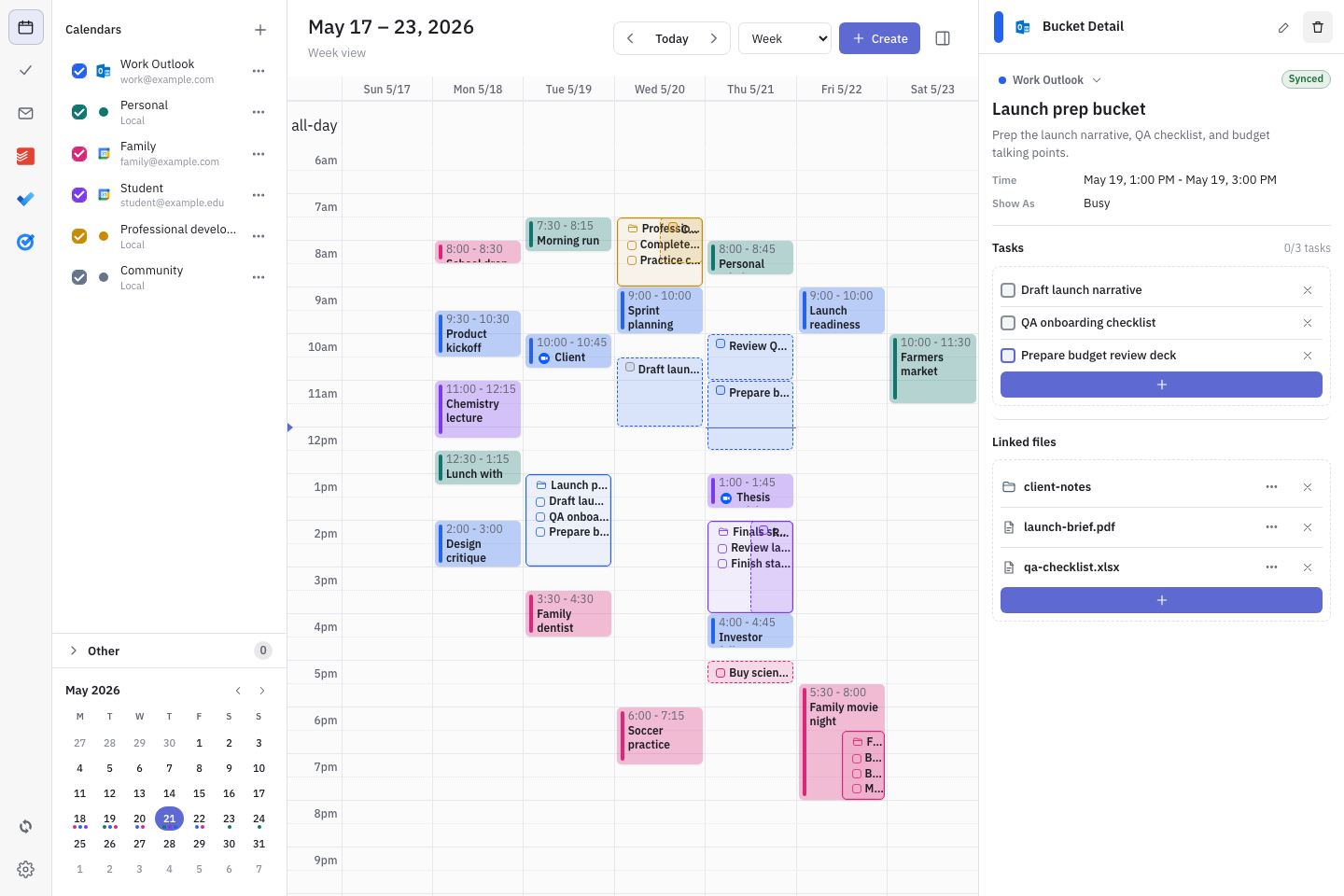
Dainvo's homepage says it brings calendars, tasks, meeting links and work files together. Its "Why Dainvo" page says the problem is scattered calendars, scattered tasks, forgotten follow ups, buried meeting links and files saved in different places.
That is the split.
Morgen helps you build a more capable planning system. Dainvo helps you make the day easier to understand.
Dainvo vs Morgen comparison table
| Category | Dainvo | Morgen |
|---|---|---|
| Main positioning | Practical clarity for real life | AI daily planner for calendars and tasks |
| Best for | People who want a simpler one place daily planner | People who want a broader AI planning suite |
| Planning style | See the day, choose what matters, block time, start work | AI recommendations plus manual control |
| AI planning | Not the main public positioning today | Mature AI Planner with recommendations, Frames and capacity aware planning |
| Calendar | See calendars together and time block important work | Multi calendar management across major providers |
| Tasks | Bring tasks from current apps into one view | Imports and syncs tasks from many task and project tools |
| Meetings | Keep meeting links close to the schedule | Booking links, scheduling links, conferencing and team availability |
| Files | Work files are part of the Dainvo day planning story | Stronger on calendar, tasks, scheduling and AI planning |
| Integrations | Google, Outlook, Apple, and CalDAV calendars; Dainvo Tasks, Google Tasks, Microsoft To Do, Todoist, TickTick, and Obsidian tasks; Meet, Teams, Zoom, and Webex; optional AI connections. Outlook Email is in development. | Google Calendar, Outlook, Apple Calendar, Fastmail, CalDAV, Notion, Todoist, Obsidian, Linear and more |
| Platforms | Desktop focused in current public article evidence | Windows, Mac, Linux, web and mobile |
| Price | Pro at the $5/month launch price | $30/month monthly or $15/month billed yearly |
| Best fit | Lower cost daily execution | Full planning suite with more breadth |
Sources: Dainvo homepage, integrations and "Why Dainvo" pages; Morgen homepage, pricing, integrations and AI Planner pages.
Where Morgen clearly wins
Morgen should win for users who need a fuller planning system.
It has the stronger story for AI planning. Morgen's AI Planner can recommend daily plans across personal, work and side project calendars, and it uses Frames to guide when different types of tasks should be scheduled.
It also has broader platform coverage. Morgen's pricing page lists apps for Windows, macOS, Linux, mobile and browser.
Morgen is also stronger if your work comes from many project tools. Its integrations page mentions importing or syncing tasks from tools like Notion, Todoist, Obsidian and Linear.
If you want one serious planning suite that handles calendars, tasks, scheduling links, calendar automations, AI planning and multiple devices, Morgen is the safer mature choice.
That is not a weakness for Dainvo. It simply defines the comparison honestly.
The Dainvo alternative case
Dainvo makes sense when Morgen feels like more product than you need.
Some users do not want a full AI planning layer. They do not want to tune Frames, manage a bigger planning system or pay for features they may not use.
They want a clear place to answer four daily questions:
- What is happening today?
- What needs my attention?
- Where is the meeting link?
- Where is the file I need?
Dainvo's public pages are built around that problem. It brings calendars, tasks, meetings and follow ups together, helps block time for important work and keeps meeting links, tasks and files connected to the schedule.
That is why Dainvo can be a strong Morgen alternative for users who want practical clarity, not maximum breadth.
Workflow comparison
Morgen workflow
- Calendars, tasks and projects
- AI Planner recommends a daily plan
- Frames guide when different work should happen
- You review, adjust and approve
- Morgen schedules the plan across your calendar
Dainvo workflow
- Calendars, tasks, meetings and files
- You see the day in one place
- You choose what matters
- You block time for the work
- You open the right link or file and start
Morgen is better when you want planning assistance. Dainvo is better when you want fewer steps before execution.
Setup and mental overhead
A more powerful planner can save time, but only if you use the power.
Morgen's AI Planner, Frames, calendar automation, booking links and integrations are useful for people with complex weeks. If you manage many calendars, have tasks across several systems, schedule with other people and want AI recommendations, that setup can pay off.
But if your planning problem is simpler, that same breadth can feel like extra overhead.
You may not need an AI Planner to tell you when to work. You may not need a large integration library. You may not need booking pages, team availability or calendar automation.
You may just need today's work in one place.
That is where Dainvo's simpler model is easier to understand. Its current connections cover Google, Outlook, Apple, and CalDAV calendars; Dainvo Tasks, Google Tasks, Microsoft To Do, Todoist, TickTick, and Obsidian tasks; Google Meet, Microsoft Teams, Zoom, and Webex; and optional ChatGPT, Codex, and Claude connections. Outlook Email follow-up is in development and is not available in the current release.
If those are the tools you already use, Dainvo may cover the daily job without asking you to adopt a larger system.
Pricing and value
Morgen is more expensive, but it also offers more.
Morgen's pricing page lists its individual monthly plan at $30/month and yearly plan at $15/month billed yearly. It also lists a 14-day free trial, 30-day money-back guarantee, Swiss-hosted GDPR compliance and trust from 248,000 plus professionals.
That price can be justified if Morgen replaces several planning tools or saves serious time through AI planning, calendar automations, scheduling links and cross platform access.
Dainvo wins on affordability.
Dainvo Pro is available at the $5/month launch price, including access to all integrations, unlimited calendar sync, task app sync, file connections and meetings in one place.
That makes the value split clear.
Choose Morgen if you will use the breadth. Choose Dainvo if you want the core daily planning job at a lower cost.
The file and work session difference
One of Dainvo's clearest advantages is how directly it talks about work readiness.
Many planners stop at tasks and calendars. Dainvo adds the practical layer around meetings and files.
Its homepage says users can keep meeting links and files ready and open the right file when it is time to work.
Dainvo's existing comparison article also describes Dainvo as a desktop app with calendar planning, task scheduling, Todoist support, buckets that let one time block contain multiple tasks, and a task composer that can create tasks for Dainvo, Todoist and Microsoft To Do from one place.
That is important for real work.
A "Project Admin" block may include three follow ups. A "Study" block may include reading, notes and review. A "Client Prep" block may need a meeting link, task list and document.
Dainvo's best story is not that it has more features than Morgen.
It is that it keeps the work session closer to the actual work.
Best fit by user type
Founder with a complex schedule
Choose Morgen if you manage multiple calendars, projects, booking links, team availability and tasks from several tools. Morgen has stronger breadth and more mature AI planning.
Choose Dainvo if your main problem is not planning intelligence, but scattered daily context. If you need tasks, meetings and files ready in one place, Dainvo is easier to justify.
Student or professional mixing work, study and personal time
Dainvo is a strong fit if your day moves between classes, work blocks, personal calendars, meetings and files. Dainvo's homepage specifically talks about seeing work, study and personal time together.
Morgen is better if you need broader platform coverage, more calendar providers or AI help planning multiple parts of life at once.
Todoist or Microsoft To Do user
Dainvo is worth considering if you already use Todoist or Microsoft To Do.
Dainvo lists Todoist and Microsoft To Do as current integrations, and its existing comparison article says the task composer can create tasks for Dainvo, Todoist and Microsoft To Do from one place.
Morgen is stronger if you also need Notion, Linear, Obsidian, Apple Calendar, Fastmail, CalDAV or broader project management support.
Remote worker with many meetings
Morgen is stronger if you need booking links, scheduling links, team availability and calendar automation.
Dainvo is stronger if you simply want meeting links close to the plan. Dainvo's integrations page says it keeps Teams, Zoom and Google Meet links where the rest of your day already lives, and it also lists Webex as a current integration.
Budget sensitive individual user
Dainvo is the easier choice on price.
At $5/month, Dainvo is much easier to justify for students, solo professionals and people who mainly want clearer daily execution. Morgen may be worth the higher price for users who will use AI planning, scheduling links, automations, more integrations and more platforms.
Choose Morgen if
Choose Morgen if you want:
- A mature AI Planner
- Planning across desktop, web and mobile
- More calendar providers
- More task and project integrations
- Booking pages and scheduling links
- Calendar automations
- Team scheduling features
- A broader planning suite you can grow into
Morgen is the stronger choice if your week is complex enough to need the breadth.
Choose Dainvo if
Choose Dainvo if you want:
- A simpler Morgen alternative
- Lower monthly cost
- Calendars, tasks, meetings and files in one place
- A clearer day plan without a large AI layer
- Meeting links and files ready when work starts
- Time blocking you control
- A planner that works with supported Google, Microsoft, Apple, CalDAV, Todoist, TickTick, Obsidian, Zoom, Teams, Meet, or Webex tools
Dainvo is the better fit if your problem is practical clarity.
Keep your current stack if
You may not need either tool if your current system already works.
Keep your current stack if:
- You already plan every day without friction.
- Your calendar and task app stay in sync.
- You do not waste time finding meeting links or files.
- You do not need AI planning.
- You do not need a new place to organize the day.
A new planner should reduce friction. If it adds more work, it is not the right tool yet.
Final verdict: Morgen for breadth, Dainvo for practical clarity
Morgen is the stronger product if you need breadth.
It has more platform coverage, more mature AI planning, broader integrations and a deeper planning ecosystem.
Dainvo is the better choice if you want the core job done more simply and cheaply.
It gives you one place for calendars, tasks, meeting links and files, without asking you to commit to a larger AI planning suite.
If Morgen feels powerful but expensive, try Dainvo and see whether practical clarity is enough for the way you work.
Try DainvoFAQ
Is Dainvo a Morgen alternative?
Yes. Dainvo is a Morgen alternative for people who want simpler daily planning with calendars, tasks, meeting links and files in one place. Morgen is stronger if you need broader integrations, AI planning, scheduling links and more platform coverage.
Is Dainvo cheaper than Morgen?
Yes. Dainvo Pro is available at the $5/month launch price. Morgen lists its individual monthly plan at $30/month or $15/month billed yearly.
Does Morgen have more integrations than Dainvo?
Yes. Morgen currently has broader public integration coverage across calendars, task apps, project tools, automation, and virtual conferencing. Dainvo covers Google, Outlook, Apple, and CalDAV calendars; Dainvo Tasks, Google Tasks, Microsoft To Do, Todoist, TickTick, and Obsidian tasks; Google Meet, Microsoft Teams, Zoom, and Webex; and optional ChatGPT, Codex, and Claude connections. Dainvo's Outlook Email follow-up is in development and is not available in the current release.
Does Dainvo have an AI Planner like Morgen?
Dainvo is not publicly positioned around an AI Planner in the same way Morgen is. Morgen's AI Planner recommends daily plans based on priorities, capacity, rhythms and goals. Dainvo is positioned around practical clarity, time blocking and one place for calendars, tasks, meetings and files.
Who should use Morgen instead of Dainvo?
Use Morgen if you need AI planning, more integrations, booking links, scheduling links, calendar automations, mobile and browser access, or a more mature planning suite.
Who should use Dainvo instead of Morgen?
Use Dainvo if you want a lower cost planner that keeps calendars, tasks, meeting links and files together so your day is easier to plan and start.
Does Dainvo work with Todoist and Microsoft To Do?
Yes. Dainvo lists Todoist and Microsoft To Do as current integrations. Dainvo's existing comparison article also says its task composer supports creating tasks for Dainvo, Todoist and Microsoft To Do from one place.
Does Dainvo work with Zoom, Teams and Google Meet?
Yes. Dainvo lists Zoom, Microsoft Teams and Google Meet as current integrations, along with Webex. Its integrations page says it keeps Teams, Zoom and Google Meet links where the rest of your day already lives.