
Motion is built for people who want their planner to make the schedule for them.
Dainvo is built for people who want to see the day clearly, make a realistic plan, and stay in control.
That is the core difference.
Motion's official pages lead with AI task planning, AI calendar scheduling, AI projects, AI docs, AI notes and AI workflows. Its AI Calendar page says Motion can recalculate your schedule when plans change and create an optimized schedule from your projects and tasks.
Dainvo takes a simpler path. It brings calendars, tasks, meeting links and work files together so you can plan what matters, time block it, and open the right thing when it is time to work.
So the question is not "Which app has more automation?"
The better question is:
Do you want full autopilot scheduling, or do you want a planner that helps you stay clear and in control?
AI builds and reshuffles the schedule for you.
You see the full day, choose what matters, and stay in control.
Quick verdict: Dainvo is the calmer Motion alternative
| Choose Dainvo if you want | Choose Motion if you want |
|---|---|
| A clear place to see calendars, tasks, meetings and files | AI to automatically plan and reshuffle your schedule |
| Lower cost daily planning | A heavier AI productivity platform |
| More control over what goes on your calendar | A planner that tells you what to work on next |
| Less tool sprawl | Built in AI projects, docs, notes and workflows |
| A simple Motion alternative for everyday planning | Full autopilot scheduling for tasks and projects |
Motion is the better fit if you want AI to manage the schedule. Dainvo is the better fit if you want the day to feel easier to understand.
Planning philosophy: autopilot vs clarity
Motion's positioning is clear. It wants to handle more of the planning for you.
Its AI Task Manager page says Motion automatically plans your day, tells you what to work on and when, and reoptimizes the schedule many times throughout the day.
That can be useful if your biggest problem is constant rescheduling. Missed deadlines, shifting meetings, overloaded projects and unclear priorities are exactly the type of problems Motion is built to attack.
But not every user wants that level of automation.
Some people do not want their planner to keep reshuffling the day. They want one place where the plan, the meeting link, the task and the file are ready when work starts.
That is where Dainvo fits better.
Dainvo's homepage describes the product around practical clarity: bring calendars, tasks, meeting links and work files together, plan what matters, time block it, and start from the right place.
How competitors frame Motion
This is not only Dainvo's angle.
Morgen's official Motion comparison says both products use AI for daily planning, but it frames Motion as the tool that uses a fully AI managed schedule, while Morgen keeps users in control of AI generated plans.
Sunsama's comparison page makes a similar point. It describes Motion as a fit for users who want tightly packed workdays and prefer being told what to work on and when.
That is useful context for Dainvo.
Motion is the high automation benchmark. Dainvo should not try to look like a heavier Motion. The better positioning is simpler:
Dainvo is for people who want clarity without handing the whole day to automation.
Dainvo vs Motion comparison table
| Category | Dainvo | Motion |
|---|---|---|
| Main promise | Your whole day in one place | AI powered productivity platform |
| Planning style | Manual clarity with time blocking | AI scheduling and automatic reshuffling |
| Best for | People who want a clear daily plan | People who want autopilot scheduling |
| Tasks | Bring tasks from favorite apps into one view | AI task manager that plans and prioritizes tasks |
| Calendar | See calendars together and time block important work | AI calendar that creates and updates schedules |
| Meetings | Keep meeting links close to the day plan | AI meeting scheduling and meeting tools |
| Files | Keep work files ready when it is time to work | More focused on AI projects, tasks, docs and scheduling |
| Integrations | Google, Outlook, Apple, and CalDAV calendars; Dainvo Tasks, Google Tasks, Microsoft To Do, Todoist, TickTick, and Obsidian tasks; Meet, Teams, Zoom, and Webex; optional AI connections. Outlook Email is in development. | Google Calendar, Zoom, Zapier, Gmail, Outlook, Teams, Slack, Siri and more |
| Price | Individual plan listed at $5/month | Pro AI listed at $19/seat/month on annual pricing |
| Best fit | Calm planning and lower cost execution | Heavy automation and AI driven scheduling |
Sources: Dainvo homepage and integrations page; Motion pricing, AI calendar, AI task manager and integrations pages.
Schedule trust: when auto scheduling helps and when it gets in the way
Auto scheduling is helpful when the app has enough accurate information to make good decisions.
Motion can help when:
- You have many tasks with deadlines.
- Your meetings change often.
- You want the app to decide what should happen next.
- You are managing projects and need the calendar to keep adjusting.
That is Motion's strength. Its AI Calendar page says it can recalculate the schedule when plans change, flag overcapacity and schedule tasks based on deadlines, duration and priorities.
The tradeoff is trust.
If a planner keeps moving tasks, the plan can start to feel less like your plan. You may find yourself checking why something moved, whether the schedule is still realistic, or whether the app packed the day too tightly.
That does not mean Motion is bad. It means Motion is opinionated.
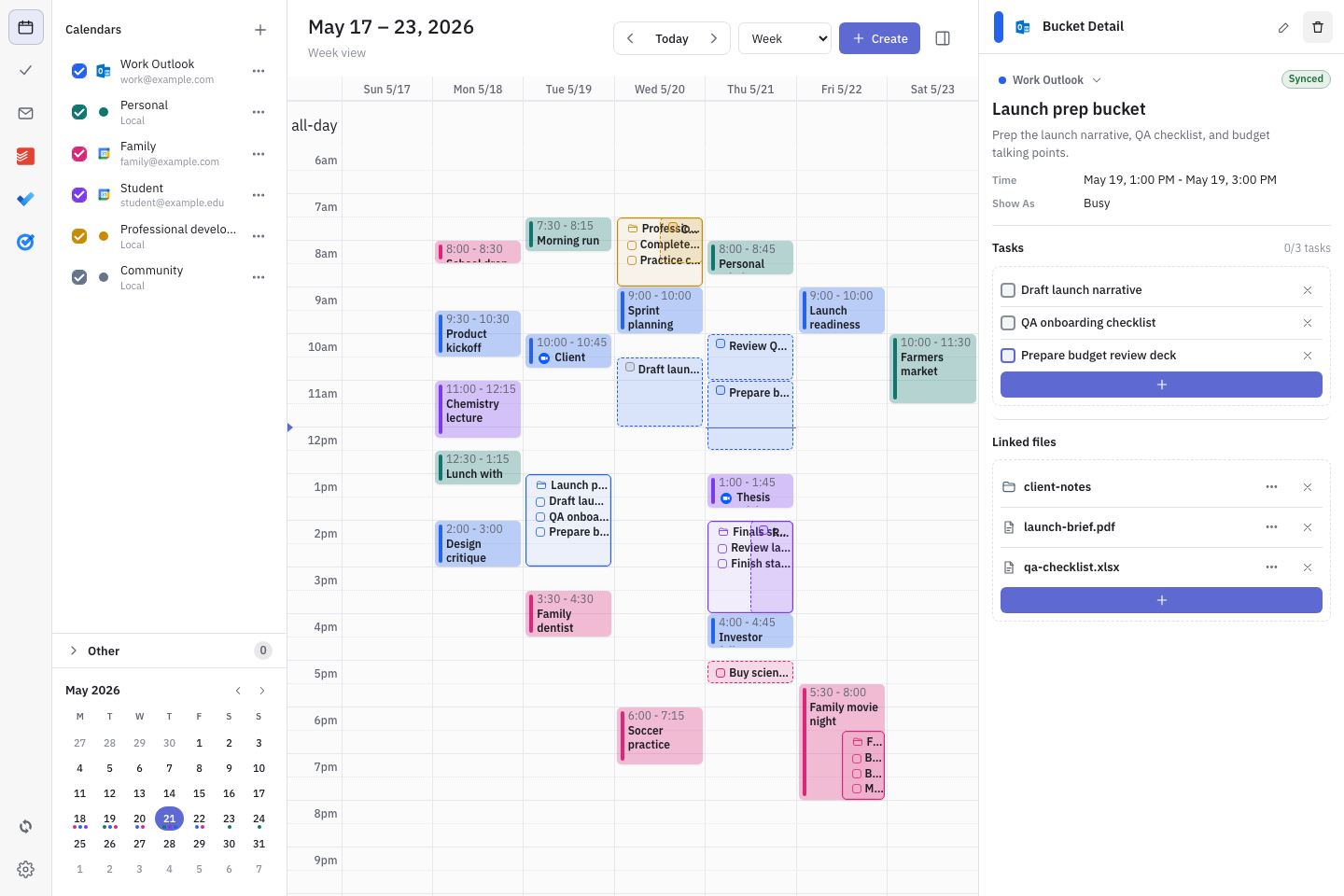
Dainvo is a better fit when you want to make the call yourself. You see the calendars, tasks, meetings and files together, then decide what deserves time today.
Workflow comparison
Motion workflow
- Tasks, meetings and projects
- AI analyzes priorities, deadlines and capacity
- Motion builds the schedule
- Motion reshuffles when plans change
- You follow the next recommended block
Dainvo workflow
- Calendars, tasks, meetings and files
- You see the full day in one place
- You choose what matters
- You time block the work
- You open the right link or file when it is time
Motion is built to reduce manual planning.
Dainvo is built to reduce scattered planning.
That difference matters because not every busy person needs more automation. Many people just need fewer places to check before they start.
Context switching: the hidden problem
A lot of planning tools focus on the task list.
But the task is only one part of the work.
You still need the calendar block. You still need the meeting link. You still need the file. You still need the follow up. You still need to know what else is happening today.
Dainvo's "Why Dainvo" page describes this problem directly: calendars are split across work, school and personal accounts; tasks are scattered across apps; meeting links are buried in invites; files are saved in different places. Dainvo solves this by bringing the moving parts of the day into one clear plan.
That makes Dainvo a strong Motion alternative for people who are not trying to replace every tool they use.
They just want the place where the day becomes actionable.
Price and value
Motion is more advanced on AI scheduling and automation. It is also more expensive.
Motion's pricing page lists Pro AI at $19/seat/month and Business AI at $29/seat/month when annual pricing is selected.
Dainvo Pro is available at the $5/month launch price. Pro includes access to integrations, unlimited calendar sync, task app sync, file connections and meetings in one place.
That price gap is important.
Motion can be worth the higher price if the automation saves you time every week. If you are running a team, managing many projects, or constantly rebuilding your schedule, the AI scheduling model may pay for itself.
Dainvo makes more sense if you want a lower cost planner that gives you visibility and control without turning your day into a fully automated system.
Pains and gains by user type
| User type | Pain with Motion style planning | Why Dainvo may fit better |
|---|---|---|
| Founder | The schedule can feel too packed or too reactive | Dainvo gives a clearer view of meetings, files, tasks and focus blocks |
| Freelancer | Client work, admin and personal time compete for space | Dainvo helps keep the day visible without needing a heavy AI system |
| Student | Classes, study blocks and personal commitments are split | Dainvo keeps work, study and personal time together |
| Professional | Meetings, tasks and files live in different apps | Dainvo puts the pieces of the workday closer together |
| Todoist or Microsoft To Do user | You may not want to move your whole task system | Dainvo integrates with Todoist and Microsoft To Do |
| Busy person on a budget | AI automation may cost more than you need | Dainvo starts at $5/month for individuals |
Dainvo is not trying to out automate Motion. It is trying to make the day easier to see.
Choose Motion if
Choose Motion if you want AI to actively manage your schedule.
Motion is the better choice if you want:
- AI to tell you what to work on next.
- Automatic scheduling and reshuffling.
- AI projects, docs, notes and workflows in one system.
- A broader productivity platform for teams or complex work.
- A planner that handles more decisions for you.
Motion is a strong product for users who want the planner to take control.
Choose Dainvo if
Choose Dainvo if you want a calmer planner with more manual control.
Dainvo is the better choice if you want:
- Calendars, tasks, meetings and files in one place.
- A lower cost Motion alternative.
- A clearer daily plan without aggressive auto scheduling.
- Time blocking that you control.
- Less switching between apps before you start work.
- A practical planner that works with tools you already use.
Dainvo's current connections cover Google, Outlook, Apple, and CalDAV calendars; Dainvo Tasks, Google Tasks, Microsoft To Do, Todoist, TickTick, and Obsidian tasks; Google Meet, Microsoft Teams, Zoom, and Webex; and optional ChatGPT, Codex, and Claude connections. Outlook Email follow-up is in development and is not available in the current release.
Final verdict: Dainvo is for clarity, Motion is for autopilot
Motion is better for full autopilot scheduling.
Dainvo is better for realistic daily planning with less friction.
If you want the app to make decisions, reshuffle the day and tell you what comes next, Motion is the stronger fit.
If you want to see your day clearly, keep your tasks, meetings and files close, and stay in control of the plan, Dainvo is the better Motion alternative.
Try Dainvo if you want a planner that helps you see the day clearly without over automating it.
Try DainvoFAQ
Is Dainvo a Motion alternative?
Yes. Dainvo is a Motion alternative for people who want calendars, tasks, meeting links and work files in one place without relying on full autopilot scheduling.
Is Dainvo cheaper than Motion?
Yes. Dainvo Pro is available at the $5/month launch price. Motion's pricing page lists Pro AI at $19/seat/month when annual pricing is selected.
Does Dainvo auto schedule like Motion?
Dainvo is positioned more around clarity, time blocking and one place for the workday. Motion is more focused on AI scheduling, automatic replanning and AI driven task prioritization.
Who should use Motion instead of Dainvo?
Use Motion if you want AI to plan your day, reshuffle tasks when plans change, and tell you what to work on next. Motion is also a better fit if you want a broader AI productivity platform with projects, tasks, docs, meetings and workflows.
Who should use Dainvo instead of Motion?
Use Dainvo if you want a calmer planner, lower monthly cost and a clearer place to manage calendars, tasks, meeting links and files.
Does Dainvo work with Todoist and Microsoft To Do?
Yes. Dainvo supports Todoist and Microsoft To Do, along with Google Tasks, TickTick, and Obsidian tasks. Supported calendars include Google, Outlook, Apple, and CalDAV. Gmail is not available in the current release.